Compose Custom theme (Dynamic theme)
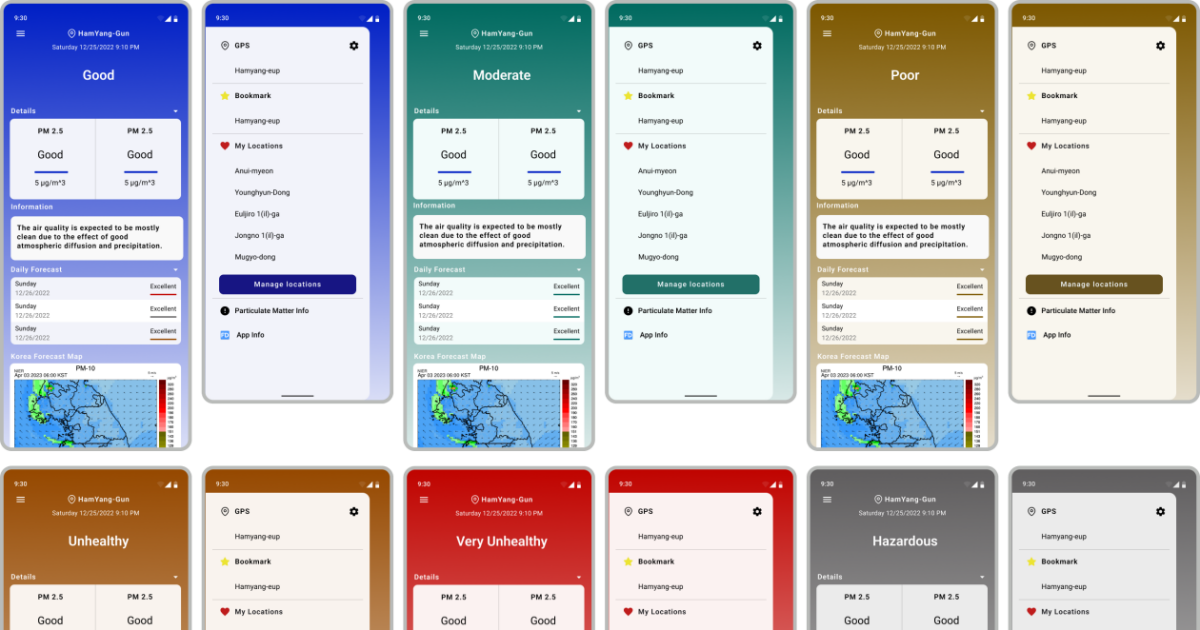
Compose에서의 커스텀 테마
기존 View 시스템에서는 theme resource를 적절히 조작하여 동적으로 테마를 변경할 수 있었습니다. 반면 Compose에서는 XML이 사용되지 않고 Kotlin으로 대체되었기 때문에 작동 방법이 완전히 다릅니다. 그래서 여러 커스텀 테마를 만들고 그것을 효율적으로 적용하기 위해서 알아야 할 것들이 있는데, 대표적으로 Stability, CompositionLocal이 있습니다.
커스텀 테마 만들기
제가 실제로 작성했던 커스텀 테마를 기반으로 설명하겠습니다. 데이터에 따라 테마가 변경되는 동적 테마도 함께 고려된 예시입니다.
1. 테마 필드 설계
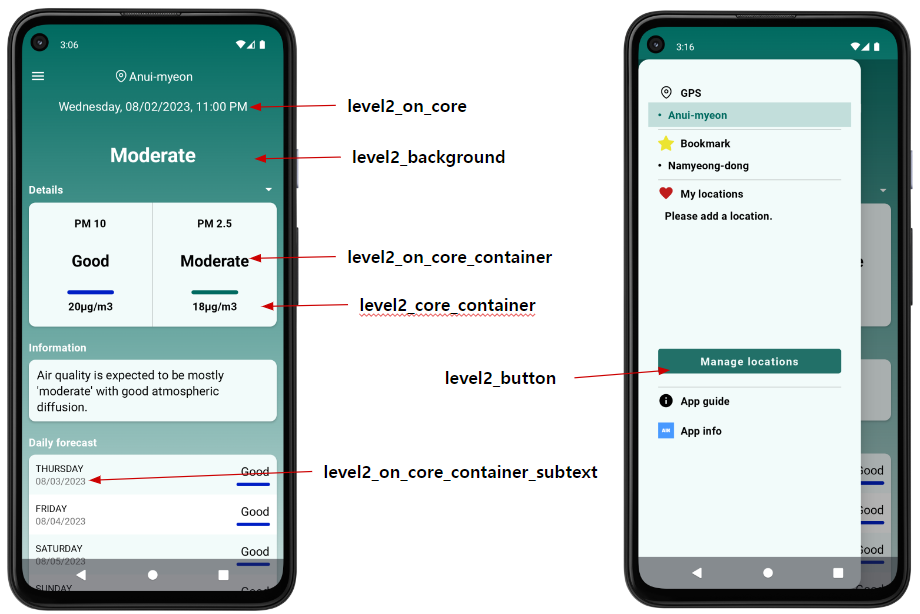
앱의 요구사항은 복잡하지 않습니다. 미세먼지 단계에 따라 배경 색상이 6단계로 변합니다. 그리고 그것에 맞게 위젯 색상, 버튼 색상 등을 동적으로 변경해야 했습니다. 아래는 제가 생각했을 때 데이터에 따라 자주 변경되거나 변경될 색상 요소를 뽑아낸 것입니다.
- core : 각 단계 별 기준 색상
- core_20 : core색상에서 알파 값 20으로 설정
- background : core와 core_20을 이용하여 만든 그라데이션 배경
- on_core : core 위에 사용될 Text를 위한 색상
- core_container : core 색상 계열의 container이며 주로 위젯 배경에 사용됨
- on_core_container : core_container 위에 사용될 Text를 위한 색상
- on_core_container_subtext : core_container 위에 사용될 subText를 위한 색상
- button : 버튼 색상
2. Stable한 Color 클래스 작성
Stability에 자세한 설명은 따로 글을 작성할 예정입니다. 여기서는 설명을 생략하겠습니다. 아래의 AIKColors클래스는 모든 매개변수가 MutableState로 선언되었기 때문에 같은 파라미터가 오면 equal() 메서드의 리턴값이 같습니다. 때문에 @Stable을 붙여서 skippable 하다고 명시하여 불필요한 recomposition을 생략합니다.
1
2
3
4
5
6
7
8
9
10
11
12
13
14
15
16
17
18
19
20
21
22
23
24
25
26
27
28
@Stable
class AIKColors(
    core: Color,
    core_20: Color,
    on_core: Color,
    core_container: Color,
    on_core_container: Color,
    on_core_container_subtext: Color,
    core_button: Color,
    core_background: Brush
) {
    var core by mutableStateOf(core)
        private set
    var core_20 by mutableStateOf(core_20)
        private set
    var on_core by mutableStateOf(on_core)
        private set
    var core_container by mutableStateOf(core_container)
        private set
    var on_core_container by mutableStateOf(on_core_container)
        private set
    var on_core_container_subtext by mutableStateOf(on_core_container_subtext)
        private set
    var core_button by mutableStateOf(core_button)
        private set
    var core_background by mutableStateOf(core_background)
        private set
}
그리고 배경 색상이 6단계로 변경되어야 하므로 level1부터 level6까지의 컬러값을 AIKColor 객체의 매개변수로 전달하여 각 단계에 맞는 AIKColors 인스턴스를 생성합니다.
1
2
3
4
5
6
7
8
9
10
11
12
13
14
15
16
17
18
19
20
21
22
23
24
25
26
27
28
29
30
31
32
33
34
private val level1Color = AIKColors(
    core = level1_core,
    core_20 = level1_core_20,
    on_core = level1_on_core,
    core_container = level1_core_container,
    on_core_container = level1_on_core_container,
    on_core_container_subtext = level1_on_core_container_subtext,
    core_button = level1_button,
    core_background = level1_background
)

private val level2Color = AIKColors(
    core = level2_core,
    core_20 = level2_core_20,
    on_core = level2_on_core,
    core_container = level2_core_container,
    on_core_container = level2_on_core_container,
    on_core_container_subtext = level2_on_core_container_subtext,
    core_button = level2_button,
    core_background = level2_background
)

private val level3Color = AIKColors(
    core = level3_core,
    core_20 = level3_core_20,
    on_core = level3_on_core,
    core_container = level3_core_container,
    on_core_container = level3_on_core_container,
    on_core_container_subtext = level3_on_core_container_subtext,
    core_button = level3_button,
    core_background = level3_background
)

...
3. CompositionLocal
컴포저블 함수는 아래로 깊어지는 경우가 대부분입니다. 그리고 상위 컴포저블의 값을 참조하기 위해서는 파라미터를 통해 전달받게 됩니다. 그럼, 앱 전역에 전달되는 테마의 경우, 앱에 존재하는 모든 컴포저블의 파라미터에 포함되어야 할까요? 이를 간단하게 해결하려면 단순히 Color 객체를 전역으로 설정하면 될 것 같습니다. 하지만 원하지 않는 부분에서도 테마에 접근이 가능하다면 문제가 될 수 있습니다. 그래서 테마를 적용할 때 CompositionLocal과 전역 객체를 함께 사용합니다. CompositionLocal은 일정한 범위의 하위 컴포저블로 데이터를 전달할 때 사용됩니다. 일반적으로 Activity의 setContent{}에 최상위 컴포저블을 작성하게 되고 그 함수를 테마 객체로 감싸기만 한다면 모든 컴포저블들이 테마값에 접근 가능해집니다. 만약 하위 컴포저블이 아니라면 에러가 발생합니다.
1
2
3
4
5
6
7
8
9
10
11
12
13
14
15
16
17
18
19
20
21
22
23
24
25
26
27
28
29
30
31
32
33
34
35
36
37
38
39
40
41
private val LocalAIKColors = compositionLocalOf<AIKColors> {
    error("No AIKColor Provided")
}

object AIKTheme {
    val colors: AIKColors
        @Composable
        @ReadOnlyComposable
        get() = LocalAIKColors.current

    val typography: Typography
        @Composable
        @ReadOnlyComposable
        get() = AIKTypography

    val shapes: Shapes
        @Composable
        @ReadOnlyComposable
        get() = Shapes
}

@Composable
fun AIKTheme(
    airLevel: AirLevel,
    content: @Composable () -> Unit
) {
    val colors = when (airLevel) {
        AirLevel.Level1 -> level1Color
        AirLevel.Level2 -> level2Color
        AirLevel.Level3 -> level3Color
        AirLevel.Level4 -> level4Color
        AirLevel.Level5 -> level5Color
        AirLevel.Level6 -> level6Color
        AirLevel.LevelError -> levelErrorColor
    }

    CompositionLocalProvider(
        LocalAIKColors provides colors,
        content = content
    )
}
코드를 처음 보시면 작동 방식에 대해 이해가 잘 안되실 수도 있습니다. 차근차근 설명해 보겠습니다.
우리는 결과적으로 아래와 같이 컬러값을 호출합니다. 여기서 AIKTheme은 위에서 선언한 싱글턴 객체입니다. 이때 저는 동적으로 컬러가 변경되기를 바라기 때문에 이 객체는 어떤 외부 요인에 의해 내부적으로 색상이 알아서 변경되어야 합니다.
1
2
AIKTheme.colors.core
AIKTheme.colors.core_20
- AIKTheme객체는 컬러 필드를 가져올때 LocalAIKColors로 부터 값을 가져옵니다. 참고로 Typography와 Shape은 하위 트리에서 변경될 일이 없어서 MaterialTheme에서 사용되는 shape과 typography를 단순 추가해 주었습니다.
- LocalAIKColors는 CompositionLocalProvider로 부터 AIKTheme 컴포저블 함수의 파라미터인 airLevel이 달라 질때 마다 AIKColors 객체를 제공받습니다.
- AIKTheme 컴포저블 함수의 Content 파라미터에 속하지 않는 다면 LocalAIKColors는 error를 발생시킵니다.
아래는 사용 예시입니다.
1
2
3
4
5
6
7
8
 override fun onCreate(savedInstanceState: Bundle?) {
        super.onCreate(savedInstanceState)
        setContent {
		AIKTheme(airLevel = AirLevel.Level1) {
			Box(modifier = modifier.background(AIKTheme.colors.core_background)) { ... }
		}
        }
}
참고 사항으로 staticCompositionLocalOf는 값이 composer에 의해서 추적되지 않아서 값이 변경되면 해당 compositionLocal값을 사용 중인 모든 것이 recompose 됩니다. 반면 compositionLocalOf는 값이 추적되어서 값 변경 시 불필요한 recompose를 제외한 최적화된 recomposition이 발생합니다. 제 앱에서 아주 빈번하게 변경되는 LocalAIKColors는 compositionLocalOf을 사용하는 게 바르다고 판단했습니다. 또 AIKTheme에서 모든 필드 값의 get 함수는 값을 읽기만 하므로 @ReadOnlyComposable을 사용하여 최적화할 수 있습니다. 세부적인 내용은 앱 요구사항에 맞게 변경하시면 됩니다.
결과물 및 회고
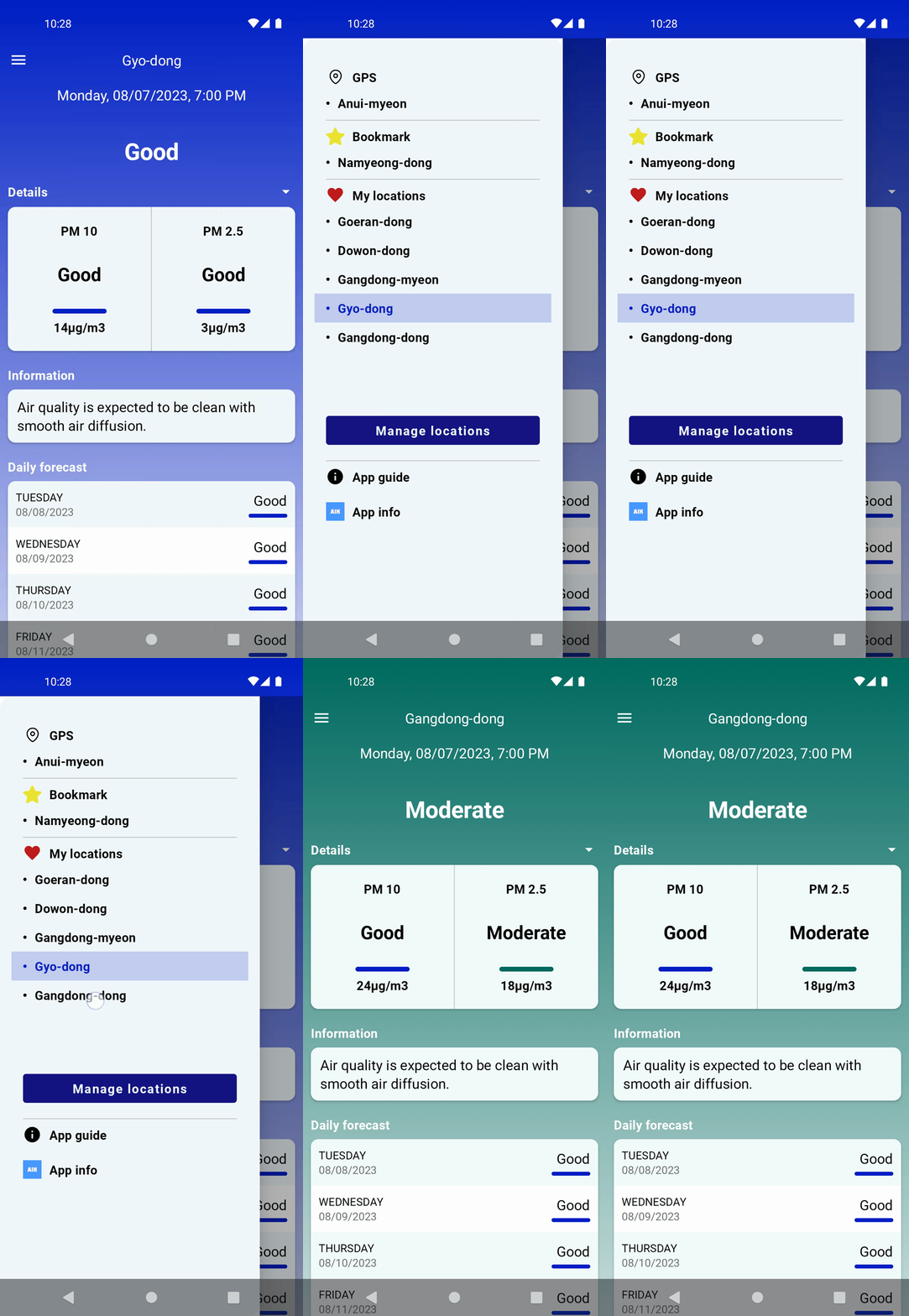
MaterialTheme 내부코드를 그대로 옮기거나 다른 블로그의 코드를 그대로 옮겨서 만들 수도 있었지만 최대한 제 앱의 요구사항에 맞게 최적화하려고 노력했습니다. 끝까지 파고들어서 코드 한 줄 한 줄에 대해 생각하며 하다 보니 오래 걸렸지만, Compose에 대해 많이 이해하게 되었습니다. 사실 위의 코드가 잘 최적화되었는지, 아니면 언제 어디서 버그가 발생할지, 알 수 없습니다. 개선점, 오류를 발견하신 분은 편하게 댓글로 남겨주시면 감사하겠습니다.